Modoboa Pro 1.2: shared mailboxes for your teams

Why shared mailboxes?
Every organization has addresses that belong to a team rather than to a person. Until now, there were two workarounds: share the password of the account, so that anyone can change it and nobody knows who did what, or forward the messages to each member, which scatters the replies across personal inboxes.
Modoboa Pro 1.2.0 solves this properly, with the standard IMAP access control lists (ACL) of Dovecot.
How it works
A shared mailbox is a regular Modoboa account: it receives mail like any other one, with aliases, filters, antispam and quota. The difference is that nobody logs into it. Its members open it from their own account, with the access level you chose for each of them:
- Read: read the messages;
- Read and write: also flag, move, file and delete messages;
- Read, write and manage folders: also create and delete subfolders.
Members never get the right to share the mailbox again: Modoboa alone decides who can access it.
In the webmail and in your IMAP client
Shared mailboxes appear in the Modoboa webmail under Shared with me, grouped by mailbox. IMAP clients that support shared folders, such as Thunderbird, list them too. The read status stays personal: when a member reads a message, it stays unread for the others.
With the Send as option, a member can also reply with the address of the shared mailbox. It is offered as a sender address in the webmail and accepted by the SMTP server, and the copy goes to the Sent folder of the member.
For administrators
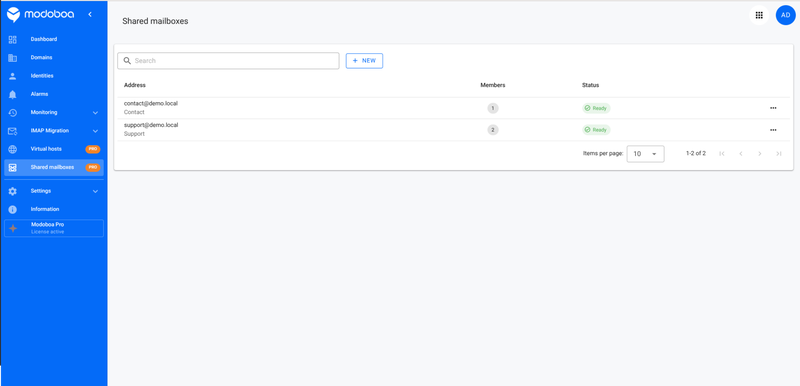
- Super administrators, resellers and domain administrators manage the shared mailboxes of their domains from a new Shared mailboxes page.
- Create a new shared mailbox, or turn an existing account such as contact@ into one: its messages are kept, its password is disabled, its sessions end and its API tokens are revoked.
- Members are picked from the domain of the shared mailbox.
- Rights are applied by a background job, with a visible status for each mailbox (Pending, Ready, Failed) and a retry action.
- Everything is also available through the REST API.
- If your license expires, the rights already applied stay in place: your teams keep their access.
This release also translates the whole plugin into French.
Upgrading from 1.1.x
Shared mailboxes require Modoboa 2.12.0 or later, with IMAP folder sharing enabled in Dovecot. The installer enables it on new installations; existing ones must first follow the upgrade instructions. Then add the new application to MODOBOA_APPS, in the settings.py file of your instance:
MODOBOA_APPS = (
    # ...
    "modoboa_pro",
    "modoboa_pro.licensing",
    "modoboa_pro.virtualhosts",
    "modoboa_pro.sharedmailboxes",
)
Register the job that applies the rights again every 10 minutes, for the folders created on the server side (special folders, Sieve filters), in your cron_config.py file, then restart the RQ scheduler:
from modoboa_pro.sharedmailboxes import jobs as sharedmailboxes_jobs

register(
    sharedmailboxes_jobs.reconcile_shared_mailboxes,
    queue_name="modoboa",
    cron="*/10 * * * *",
)
Finally, upgrade the package and restart the services. Make sure a worker runs the dovecot queue: it applies the rights of the members.
<venv>/bin/pip install -U modoboa-pro
cd <modoboa_instance>
<venv>/bin/python manage.py migrate
<venv>/bin/python manage.py collectstatic --noinput
systemctl restart modoboa       # web / uwsgi
systemctl restart modoboa-rq    # background workers
What's next
Modoboa Pro is a growing suite: after virtual hosts and shared mailboxes, the next modules will keep making the daily work of administrators easier. Not a customer yet? Discover the plans on modoboa.com.